

DGPikDGPik
  • Wedding Album PSD
  • Photoshop Add-ons
    • Photoshop Plugins/Panel
    • Photoshop Gradients
    • Camera Raw Presets
    • Photoshop Brushes
    • Photoshop Actions
    • Layer Styles
  • Lightroom Presets
  • Free Mockups
  • Backgrounds
  • Photo Overlays
  • LUTs
DGPikDGPik
Search
Follow US
Copyright © 2014-2023 Ruby Theme Ltd. All Rights Reserved.
LUTs

Pop Movie Look LUTs For Premiere Pro

Published April 14, 2023
SHARE

Pop Movie Look LUTs For Premiere Pro Free Download This is a Premiere Pro template that features a collection of 11 cinematic Luts. You can use these effects to enhance your media. Use them at the beginning, in the middle, and at the end of your videos. A video tutorial is included in the package. Try it now! In this collection, you can see cinematic color presets in Premiere Pro , which are available for download in PRPSET, CUBE, MP4, and JPG formats. 70+ Hollywood LUT Color Grading Pack
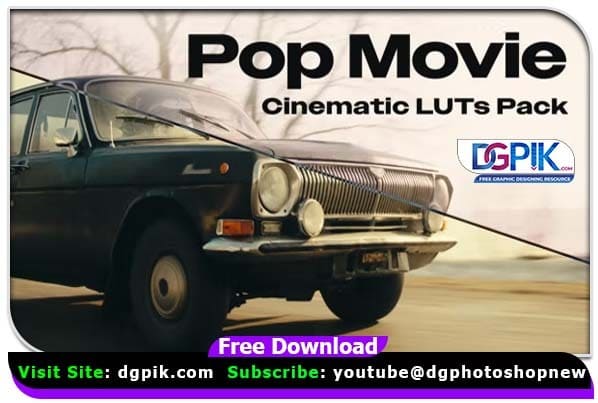
Pop Movie Look LUTs - After Effects Presets

General characteristics of this collection:

  • Compatible with Premiere Pro CC 2019 and above
  • Resolution: 3840×2160 4K
  • No plug-in required
  • Includes preview video
  • Includes 11 cinematic Luts If you want you can also Download. LUTs

Pop Movie Look LUTs

https://dgpik.com/wp-content/uploads/2023/04/Pop.Movie_.Look_.LUTs_.mp4

Download the File Easily From the Download Link Given Below

Password is : dgpik.com

Download dgpik

How to install LUTs in Premiere Pro

To install LUTs in Premiere Pro, follow these steps:

  1. Open Premiere Pro and create a new project or open an existing one.
  2. Go to the “Color” tab at the top of the screen.
  3. In the “Creative” section, click on the “Look” drop-down menu and select “Browse.”
  4. This will open the “Browse” dialog box. Navigate to the location where your LUTs are stored.
  5. Select the LUTs you want to install and click “Open.”
  6. The LUTs will now appear in the “Looks” drop-down menu in the “Creative” section of the “Color” tab.
  7. To apply a LUT to a clip, simply drag it from the “Looks” drop-down menu onto the clip.

That’s it! You’ve successfully installed and applied LUTs in Premiere Pro.
Share This Article
Facebook Twitter Copy Link Print

Popular Posts

Почему последовательность составляющих критична для UX
Uncategorized
The Crystalline Collection Photoshop Action Free
The Crystalline Collection Photoshop Action
Photo Effect
THE FLORA COLLECTION Photoshop Action
The Flora Collection Photoshop Action
Photo Effect
THE WANDERLUST COLLECTION Photoshop Action
The Wanderlust Collection Photoshop Action
Photo Effect
THE ROYAL COLLECTION Photoshop Action
The Royal Collection – Photoshop Action Preset
Photo Effect

Categories

  • ! Без рубрики
  • 12×36 Spread Design
  • 12×36 Templates
  • 16×24 Album Design
  • Adobe Photoshop Tutorial
  • Album Design
  • Album Design Software
  • Album DM Pack
  • Alphabet Letters
  • Anniversary Gifts
  • Artistic Editing
  • Astronaut
  • Aviator Clients Site
  • Baby Album PSD
  • Baby Photography
  • Backgrounds
  • Banners
  • Big Bass Splash
  • Birthday Album PSD
  • Birthday Collage
  • Birthday Design
  • Birthday Templates
  • Branding
  • Business Card Psd
  • Camera Raw Assets
  • Camera Raw Presets
  • Camera Raw Tools
  • Cinematic Design
  • Clip Part
  • Close-up Designs
  • Collage Design
  • Creative Design
  • Digital Assets
  • Digital Backgrounds
  • Digital Bundle
  • Digital Downloads
  • Digital Invitations
  • Digital Products
  • Digital Stationery
  • Digital Studio Tools
  • Divaspin
  • Double Exposure PSD
  • Facebook Covers
  • Floral Album Design
  • Flyers
  • Fonts
  • Format Design
  • Gift Items
  • Graphic Design
  • Graphic Design Assets
  • Ice Fishing Game
  • ID Card Design
  • iGaming
  • Illustrator Files
  • Indian Wedding Designs
  • Indian Wedding Vidhi
  • Inner Sheet Templates
  • Instagram Templates
  • Invitation Branding
  • Kids Album Design
  • Kids Modeling PSD
  • Kids Photography
  • Kids Studio Design
  • Large Format Designs
  • Layer Styles
  • Lettering Font Png
  • Lightroom Presets
  • Logo Design
  • LUTs
  • Marathi Wedding PSD
  • Mobile Invitations
  • Mug Design PSD
  • news
  • Photo Collage Frame
  • Photo Effect
  • Photo Frame PSD
  • Photo Frames
  • Photo Overlays
  • Photography Assets
  • Photography Automation
  • Photography Marketing
  • Photography Presets
  • Photoshop Actions
  • Photoshop Add-ons
  • Photoshop Brushes
  • Photoshop Gradients
  • Photoshop Plugins
  • Photoshop Plugins/Panel
  • Photoshop Shapes
  • Photoshop Templates
  • Photoshop Tools
  • Photoshop Video Tutorial
  • PNG Files
  • Portfolio Packs
  • Portrait Photography
  • Portrait Tools
  • Pre-Wedding PSD
  • Premium Prouduct
  • Psd Files
  • Psd Mockup
  • Public
  • Save the Date
  • Social Media Design
  • Software
  • Stock Photo
  • Studio Background
  • Studio Backgrounds
  • Sublimation Printing
  • Text Effects
  • Textures
  • Transitions Pack
  • Uncategorized
  • Vector Files
  • Wedding Album Inner PSD
  • Wedding Album PSD
  • Wedding Cover PSD
  • Wedding Design
  • Wedding Editing
  • Wedding Editing Tools
  • Winter Graphics Bundle
  • ГГбет RU

You Might Also Like

Dreamy Blue Color Grading Tutorial Using Photoshop Action

LUTs
20 of Blossom Beauty Professional LUT Pack

20 of Blossom Beauty Professional LUT Pack

LUTs
Medium to Dark SkinTone LUTs For Photoshop

Medium to Dark Skin Tone LUTs For Photoshop

LUTs
Colorify Wedding LUTs Free Download

50 Colorify Wedding LUTs Free Download

LUTs
© 2016-2025 All rights reserved DGPik.com
  • Contact us
  • DMCA
  • Privacy Policy
  • Terms and Conditions
Welcome Back!

Sign in to your account

Username or Email Address
Password

Lost your password?

