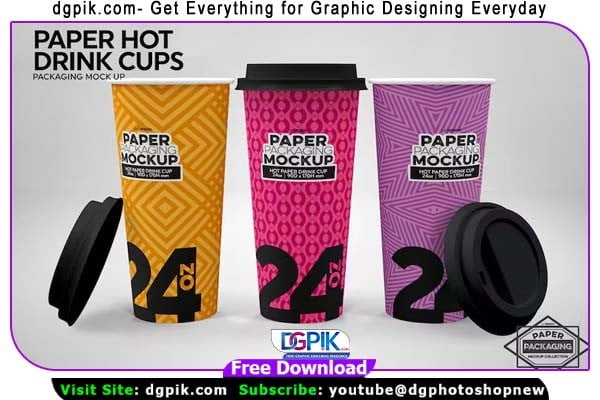
The Paper Hot Drink Cups Packaging PSD Mockup Free Download is a versatile design template that allows you to showcase your branding and packaging designs for paper cups used for hot beverages. With Customizable features, high-resolution graphics, and realistic Mockup effects, it provides a professional and visually appealing presentation for your product.You Can Also Download Juice Plastic Cup Psd Mockup

7 High Resolution psd Mock ups with several Mockup scene options of Hot Paper cup packaging — perfect for presentations or showcasing your design work
- 245: Paper Hot Drink Cups – Group
- 246: 24oz Paper Hot Drink Cups
- 247: 20oz Paper Hot Drink Cups
- 248: 16oz Paper Hot Drink Cups
- 249: 12oz Paper Hot Drink Cups
- 250: 10oz Paper Hot Drink Cups
- 251: 8oz Paper Hot Drink Cups
Include:
- Seven (7) layered PSD Mock-ups
- High quality/resolution files
- 5400 x 3600
- 18”x 12″
- 300 dpi
Scaled to sizes :
- 24oz: 90 diameter x 170H mm
- 20oz: 90 diameter x 150H mm
- 16oz: 90 diameter x 135H mm
- 12oz: 90 diameter x 112H mm
- 10oz: 90 diameter x 95H mm
- 8oz: 90 diameter x 85H mm
Lid:
- 95 diameter x 18H mm
- Customize cup Colors
- Choose which cup is visible
- Show or Hide Lids
- Different designs per cup
- Option to add your own background image or change background color
- Scaled to indicated cup size
These are blank psd templates ready to display your designs. Designs on the preview images are for sample purposes and are **not** included. These templates work best using Photoshop CC 2018 and up
- Minimalist background to make your designs stand out
- Editable smart objects with layers Fully Named
- Easy to use and Impressive presentation for clients
- Photo Realistic Production
- Please see the preview samples
Download the File Easily From the Download Link Given Below
Password is: dgpik.com
 DOWNLOAD NOWPaper Hot Drink Cups Packaging Psd Mockup (01)
 DOWNLOAD NOWPaper Hot Drink Cups Packaging Psd Mockup (02)
 DOWNLOAD NOWPaper Hot Drink Cups Packaging Psd Mockup(03)
 DOWNLOAD NOWPaper Hot Drink Cups Packaging Psd Mockup (04)
 DOWNLOAD NOWPaper Hot Drink Cups Packaging Psd Mockup (05)
 DOWNLOAD NOWPaper Hot Drink Cups Packaging Psd Mockup (06)
 DOWNLOAD NOWPaper Hot Drink Cups Packaging Psd Mockup (07)
 This item is part of the Paper Packaging Mockup Collection
• Minimalist background to make your project stand out
• Change Background Color
• Option to add your own background image
• Editable smart objects with layers Fully Named
• Easy to use and Impressive presentation for clients
• Photo Realistic Production
• Please see the preview samples
How to Use PSD Mockup
Using a PSD mockup is a great way to showcase your designs or products in a realistic and professional manner. Here are the steps to use a PSD mockup:
- Download the PSD mockup file: Find a suitable PSD mockup from reliable sources and download it to your computer.
- Extract the files: If the mockup file is compressed (e.g., in a ZIP folder), extract the files to a location on your computer.
- Open the PSD file: Locate the main PSD file in the extracted files and open it in Adobe Photoshop or a similar software that supports PSD files.
- Edit the smart objects: Within the PSD file, you’ll find smart objects that represent the areas where you can insert your own designs. Double-click on these smart objects to open them in a new window.
- Insert your design: In the new window, you can paste or drag and drop your design into the smart object. Ensure that your design fits well within the designated area and adjust it if necessary.
- Save and close the smart object: After inserting your design, save the changes made to the smart object and close the window. The main PSD file will now update with your design.
- Customize the mockup: Depending on the mockup, you may have additional customization options such as adjusting colors, shadows, or background elements. Use the available layers and adjustment tools to make desired modifications.
- Save and export: Once you are satisfied with your mockup, save the final version as a PSD file to preserve the layers and editable elements. If you need to share the mockup or use it in other applications, export it to a suitable file format like JPEG or PNG.
Remember to refer to any specific instructions or documentation provided with the mockup for detailed guidance.