
DGPikDGPik
  • Wedding Album PSD
  • Photoshop Add-ons
    • Photoshop Plugins/Panel
    • Photoshop Gradients
    • Camera Raw Presets
    • Photoshop Brushes
    • Photoshop Actions
    • Layer Styles
  • Lightroom Presets
  • Free Mockups
  • Backgrounds
  • Photo Overlays
  • LUTs
DGPikDGPik
Search
Follow US
Copyright © 2014-2023 Ruby Theme Ltd. All Rights Reserved.
Photoshop Gradients

200 gold or golden Photoshop color gradients

Published February 4, 2023
SHARE

today i Share with You Photoshop gradient To create 200 gold or golden color gradients for Photoshop, you would need to use the gradient tool in Photoshop and experiment with different color combinations to achieve the desired golden hue. You can also use pre-existing gradient sets available online as a starting point and modify them to fit your needs. It is recommended to have a basic understanding of color theory and how to use the gradient tool in Photoshop to create smooth color transitions. You Can Also Downlaod Photoshop Gradients.

200 free gold or golden Photoshop color gradients

topic of Photoshop gradients

Photoshop gradients refer to the smooth transitions of colors within an image or design created using Adobe Photoshop. Gradients can add depth, interest, and dimension to digital designs and are used in a wide range of projects, including graphic design, digital art, and web design.

In Photoshop, there are several types of gradients to choose from, including linear, radial, angle, and reflected. The Gradient Tool in Photoshop allows designers to create gradients by selecting colors, adjusting the angle and length of the gradient, and changing the opacity and transition between colors.

Gradients can be used to create backgrounds, as shading and highlights in illustrations, as color overlays in photos, and more. They are a versatile and essential tool in the toolkit of many graphic designers and digital artists.

Overall, Photoshop gradients provide an easy way to add color and visual interest to digital designs, and with the flexibility and versatility of the Gradient Tool in Photoshop, the possibilities for gradient use are virtually endless.
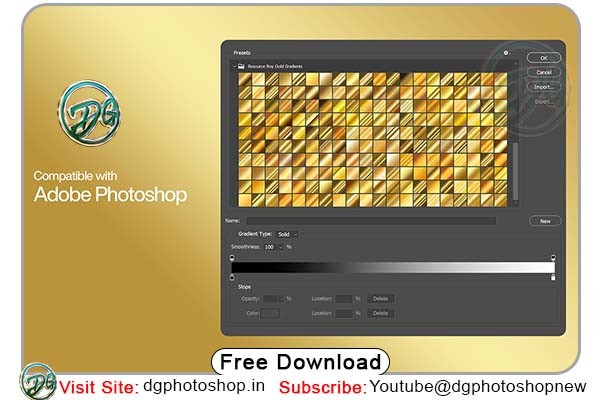
200 free gold or golden Photoshop color gradients Free

how to use the gradient tool in Photoshop

The Gradient Tool in Adobe Photoshop can be used to create smooth color transitions between multiple colors. Here are the steps to use the Gradient Tool:

  1. Select the Gradient Tool: The Gradient Tool can be found in the toolbar on the left-hand side of the Photoshop window, and it looks like a linear gradient. You can also access it by pressing the “G” key on your keyboard.
  2. Choose the type of gradient you want to create: The Gradient Tool offers different types of gradients, including linear, radial, angle, and reflected. Choose the type of gradient that you want to use from the options bar at the top of the screen.
  3. Select the colors you want to use: You can choose colors for your gradient by selecting the Foreground and Background colors in the toolbar, or by clicking on the color swatches in the options bar to open the Color Picker.
  4. Draw the gradient: To create the gradient, click and drag your mouse in the direction you want the gradient to go. You can also adjust the angle, length, and opacity of the gradient by using the options bar at the top of the screen.
  5. Adjust the gradient: After creating the gradient, you can adjust it further by using the Gradient Editor. The Gradient Editor allows you to add more colors, change the opacity and location of color stops, and adjust the transition between colors.

Remember to experiment with different color combinations, gradients types and settings to achieve the desired result.

Zip File Password: dgphotoshop.in

The file is compressed using Zip or Rar format…please use Winrar to extract this file


Share This Article
Facebook Twitter Copy Link Print

Popular Posts

2025 One Click Pro 4.8 & Album Quicker 6.8
Album Design Software
The Crystalline Collection Photoshop Action Free
The Crystalline Collection Photoshop Action
Photo Effect
THE FLORA COLLECTION Photoshop Action
The Flora Collection Photoshop Action
Photo Effect
THE WANDERLUST COLLECTION Photoshop Action
The Wanderlust Collection Photoshop Action
Photo Effect
THE ROYAL COLLECTION Photoshop Action
The Royal Collection – Photoshop Action Preset
Photo Effect

Categories

  • 12×36 Spread Design
  • 12×36 Templates
  • 16×24 Album Design
  • Adobe Photoshop Tutorial
  • Album Design
  • Album Design Software
  • Album DM Pack
  • Alphabet Letters
  • Anniversary Gifts
  • Artistic Editing
  • Baby Album PSD
  • Baby Photography
  • Backgrounds
  • Banners
  • Birthday Album PSD
  • Birthday Collage
  • Birthday Design
  • Birthday Templates
  • Branding
  • Business Card Psd
  • Camera Raw Assets
  • Camera Raw Presets
  • Camera Raw Tools
  • Cinematic Design
  • Clip Part
  • Close-up Designs
  • Collage Design
  • Creative Design
  • Digital Assets
  • Digital Backgrounds
  • Digital Bundle
  • Digital Downloads
  • Digital Invitations
  • Digital Products
  • Digital Stationery
  • Digital Studio Tools
  • Double Exposure PSD
  • Facebook Covers
  • Floral Album Design
  • Flyers
  • Fonts
  • Format Design
  • Gift Items
  • Graphic Design
  • Graphic Design Assets
  • ID Card Design
  • Illustrator Files
  • Indian Wedding Designs
  • Indian Wedding Vidhi
  • Inner Sheet Templates
  • Instagram Templates
  • Invitation Branding
  • Kids Album Design
  • Kids Modeling PSD
  • Kids Photography
  • Kids Studio Design
  • Large Format Designs
  • Layer Styles
  • Lettering Font Png
  • Lightroom Presets
  • Logo Design
  • LUTs
  • Marathi Wedding PSD
  • Mobile Invitations
  • Mug Design PSD
  • Photo Collage Frame
  • Photo Effect
  • Photo Frame PSD
  • Photo Frames
  • Photo Overlays
  • Photography Assets
  • Photography Automation
  • Photography Marketing
  • Photography Presets
  • Photoshop Actions
  • Photoshop Add-ons
  • Photoshop Brushes
  • Photoshop Gradients
  • Photoshop Plugins
  • Photoshop Plugins/Panel
  • Photoshop Shapes
  • Photoshop Templates
  • Photoshop Tools
  • Photoshop Video Tutorial
  • PNG Files
  • Portfolio Packs
  • Portrait Photography
  • Portrait Tools
  • Pre-Wedding PSD
  • Premium Prouduct
  • Psd Files
  • Psd Mockup
  • Save the Date
  • Social Media Design
  • Software
  • Stock Photo
  • Studio Background
  • Studio Backgrounds
  • Sublimation Printing
  • Text Effects
  • Textures
  • Transitions Pack
  • Uncategorized
  • Vector Files
  • Wedding Album Inner PSD
  • Wedding Album PSD
  • Wedding Cover PSD
  • Wedding Design
  • Wedding Editing
  • Wedding Editing Tools
  • Winter Graphics Bundle

You Might Also Like

Photoshop Gradeint with Various Color Spectrum

Photoshop Gradeint with Various Color Spectrum

Photo Effect
Geometric Gradient Wipe Effect Photoshop Actions

Geometric Gradient Wipe Effect Photoshop Actions

Photo Effect

126 Black and White Gradients Free Download

Photoshop Add-ons
200 Pink Photoshop Gradients

200 Pink Photoshop Gradients

Photoshop Add-ons
© 2016-2025 All rights reserved DGPik.com
  • Contact us
  • DMCA
  • Privacy Policy
  • Terms and Conditions
Welcome Back!

Sign in to your account

Username or Email Address
Password

Lost your password?


