20 Christmas Photo Overlays Free Download Creative invitations, flyers or websites with winter motifs are not a problem anymore! Artistic, wintry and of course Christmas choice of illustrations is now available. Differently shaped snowflakes are at your service to determine what suits your project best. Photo Overlays Just use the completely created templates and adjust the text to your wishes! It is so simple to make your work enjoyable!

Illustrations for Christmas can also be found in the examples tab. Take a look and let yourself get inspired by the variety of 20 ready-to-use Christmas overlays. You’ll see that the content covers a wide variety of trends, such as flat, traditional or playful design.You Can Also Download Christmas Tree Branches Photo Overlays
All elements consist of individual content and are scalable in size without loss of quality as well as are easily editable if required, so their look can be personalized according to your own standards. Do not hesitate to check our examples of greeting cards with winter motives and illustrations for Christmas. Let winter motives in your compositions!
See what you will be able to do
Below you can find Preset Power Examples from each Package.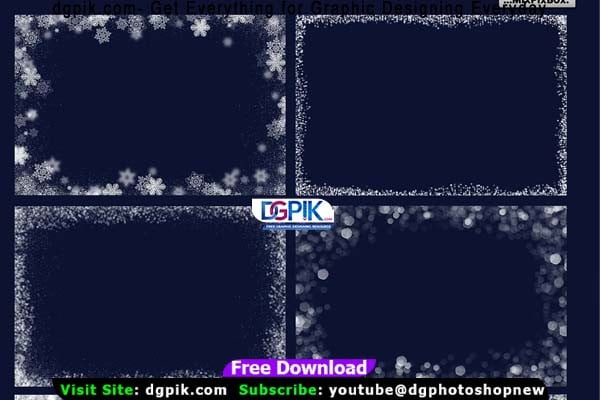




DETAILS:
20 photo overlays PNG format with transparent background high resolution (5100x3450px – 300dpi – JPEG)
Can be used with any software that work with PNG format, Adobe Photoshop, Photoshop Elements, Paint Shop Pro, etc. Easy to use.
Download the File Easily From the Download Link Given Below
Password is: dgpik.com
How to Use Photo Overlays
Using photo overlays can enhance and transform your images by adding creative elements, textures, or visual effects. Here’s a step-by-step guide on how to use photo overlays:
- Obtain your photo overlay: You can either create your own overlay using image editing software like Adobe Photoshop or find pre-made overlays online. Many websites offer free or paid overlays that you can download and use.
- Select your base image: Choose the photo you want to edit and open it in your preferred image editing software. Make sure it’s in a format compatible with overlays, such as JPEG or PNG.
- Open the overlay file: Open the overlay file in your image editing software. If it’s a separate image file, go to “File” and “Open” to import it. The overlay should appear as a new layer on top of your base image.
- Adjust the overlay position and size: Resize and reposition the overlay layer to fit your base image. Use the transformation tools in your software, such as the move or transform tool, to adjust the size, rotation, and position of the overlay. You can usually find these tools in the toolbar or under the Edit menu.
- Blend the overlay with the base image: To make the overlay blend seamlessly with your photo, adjust its opacity or blending mode. Opacity controls the transparency of the overlay layer, allowing the base image to show through. Experiment with different opacities to achieve the desired effect. Blending modes determine how the overlay interacts with the colors and tones of the base image. Common blending modes include Overlay, Screen, Multiply, and Soft Light. Try different blending modes to see which one works best for your overlay.
- Refine and customize: Depending on the overlay and your desired outcome, you can further refine and customize the effect. Explore additional editing tools such as adjusting brightness, contrast, saturation, or applying filters to enhance the overall look. You can also experiment with layer masks or erasers to selectively hide or reveal parts of the overlay.
- Save your edited image: Once you’re satisfied with the result, save your edited image as a new file to preserve your original photo. Choose a file format that supports transparency, such as PNG, if you want to maintain any transparent areas within the overlay.
By following these steps, you can effectively use photo overlays to add creative elements or effects to your images. Remember to experiment, be creative, and have fun exploring the possibilities of overlays to achieve the desired visual impact.